
반응형
[수업내용정리]
1. 점수기능추가
2. UI Manager 실습
3. Item 랜덤 위치, 조합 구현
4. SoundManager / Gamemanager
1. 점수 기능
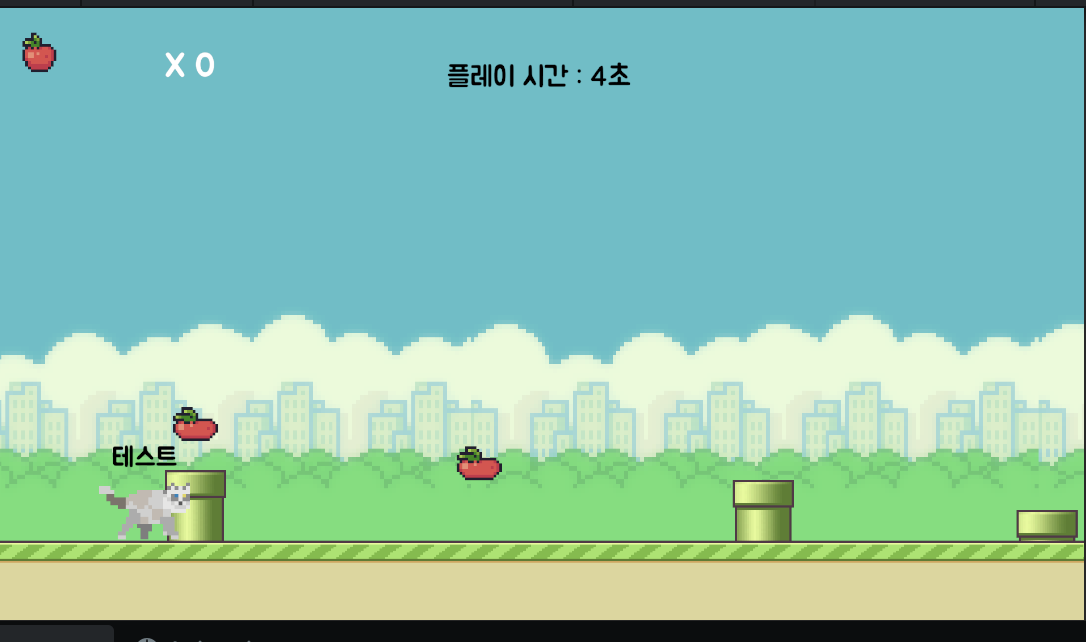
- UI : Canvas에 Image 추가 -> Source Image에 애니메이션 추가 + 텍스트 생성 (이미지의 자식)
- 사과 애니메이션 - Collider is Trigger ON
- 사과에 Apple Tag 추가
- ITEM 자식에 Pipe와 사과 추가
// CatController 스크립트
 private void OnTriggerEnter2D(Collider2D other)
 {
     if (other.gameObject.CompareTag("Apple"))
     {
         other.gameObject.SetActive(false);
     }
 }
- ItemEvent. cs
// ItemEvent 스크립트
public float moveSpeed = 3f;

public float returnPosX = 15f; / 오브젝트가 오른쪽으로 재배치될 X 좌표 값
public float randomPosY;

private void Start()
{
    // 시작할 때 오브젝트 위치를 (returnPosX, 랜덤 Y값, 0)으로 설정

   randomPosY = Random.Range(-6.5f, -3f);
    transform.position = new Vector3(returnPosX, randomPosY, 0);

}
void Update()
{
    transform.position += Vector3.left * moveSpeed * Time.deltaTime;

    if (transform.position.x <= -returnPosX)
    {
        randomPosY = Random.Range(-6.5f, -3f);
        transform.position = new Vector3(returnPosX, randomPosY, 0);
    }
}
- Collected (먹었을때의 효과 애니메이션 적용)
- 기본값: 비활성화
// ItemEvent 스크립트

public GameObject CollectedEffect;
// CatController 스크립트
private void OnTriggerEnter2D(Collider2D other)
{
    if (other.gameObject.CompareTag("Apple"))
    {
        other.gameObject.SetActive(false);

        // 충돌한 사과 오브젝트의 부모 오브젝트에 붙어있는 ItemEvent 스크립트에 접근
        other.transform.parent.GetComponent<ItemEvent>().CollectedEffect.SetActive(true);
    }
}
- 먹은 개수 표시 UI (GameManager)
 // GameManager 스크립트
 public TextMeshProUGUI playTimeUI;
 public TextMeshProUGUI scoreUI;

 private float timer;
 static public int score; // 먹은 사과 개수를 저장하는 정적 변수 (모든 인스턴스가 공유)

 void Update()
 {
     timer += Time.deltaTime;

     playTimeUI.text = $"플레이 시간 : {timer:F0}초";
     // 플레이 시간 텍스트에 현재 시간을 초 단위로 반올림해서 표시 (예: "플레이 시간 : 10초")
     scoreUI.text = $"X {score}";
     // 점수 텍스트에 먹은 사과 개수를 'X 개수' 형식으로 표시 (예: "X 3")
 }
// CatController 스크립트
 private void OnTriggerEnter2D(Collider2D other)
 {
     if (other.gameObject.CompareTag("Apple"))
     {
         other.gameObject.SetActive(false);
         other.transform.parent.GetComponent<ItemEvent>().particle.SetActive(true);

         GameManager.score++;
        // GameManager 클래스의 static 변수 score를 1 증가시킴
     }
 }
2. Intro, Play 연결하는 UI Manager와 연결
// UIManager 스크립트
public GameObject playUI; // 플레이 화면 UI

public void OnStartButton()
{
    bool isNoText = inputField.text == "";

    if (isNoText)
    {
        Debug.Log("입력한 텍스트 없음");
    }
    else
    {
        playObj.SetActive(true);
        playUI.SetActive(true);
        introUI.SetActive(false);

        // GameManager 내 isPlay 변수를 true로 변경해 게임 진행 상태 표시
        GameManager.isPlay = true;

        Debug.Log($"{nameTextUI} 입력");
        nameTextUI.text = inputField.text;
    }
}
// GameManager 스크립트

public TextMeshProUGUI playTimeUI;
public TextMeshProUGUI scoreUI;

private float timer;
public static int score;
public static bool isPlay;

void Update()
{
    if (!isPlay) return;  // 게임이 시작되지 않았으면 아래 코드 실행하지 않고 종료

    timer += Time.deltaTime;

    playTimeUI.text = $"플레이 시간 : {timer:F0}초";
    scoreUI.text = $"X {score}";
}
3. Item 연속해서 랜덤 조합으로 나오기 (ItemEvent)
using UnityEngine;

public class ItemEvent : MonoBehaviour

{  // ItemEvent 스크립트

    public enum ColliderType {Pipe, Apple, Both}
    public ColliderType colliderType; // 충돌 타입


    public GameObject pipe;
    public GameObject apple;
    public GameObject Both;

    public float moveSpeed = 3f;

    public float returnPosX = 15f;
    public float randomPosY;


    private void Start()
    {  // 게임 시작 시 현재 위치의 X좌표 기준으로 랜덤 위치 설정
        SetRandomSetting(transform.position.x);

    }
    void Update()
    {	 // 오브젝트를 왼쪽(-X 방향)으로 이동시킴
        transform.position += Vector3.left * moveSpeed * Time.deltaTime;

        if (transform.position.x <= -returnPosX)
            SetRandomSetting(returnPosX);
    }

    private void SetRandomSetting(float posX)
    {
        randomPosY = Random.Range(-6f, -4.5f);
        transform.position = new Vector3(posX, randomPosY, 0);

        pipe.SetActive(false);
        apple.SetActive(false);
        collectedEffect.SetActive(false);

        // 충돌 타입을 랜덤하게 결정 (0~2: Pipe, Apple, Both 중 하나)
        colliderType = (ColliderType)Random.Range(0, 3); // 0: Pipe, 1: Apple, 2: Both

        switch (colliderType)
        {
            case ColliderType.Pipe:
                pipe.SetActive(true);
                break;
            case ColliderType.Apple:
                apple.SetActive(true);
                break;
            case ColliderType.Both:
                pipe.SetActive(true);
                apple.SetActive(true);
                break;
        }
    }

}
4. 사운드 추가 ( SoundManager = 소리 설정 + GameManager = 재생 )
//GameManager
namespace Cat
{
    public class SoundManager : MonoBehaviour
    {
        public AudioSource audioSource;     // 사운드 출력용 오디오 소스

        public AudioClip introBgmClip;
        public AudioClip colliderClip;

        public AudioClip playBgmClip;
        public AudioClip jumpClip;


        // 배경음악 설정 및 재생 (인자로 "Intro" 또는 "Play" 받음)
        public void SetBGMSound(string bgmName)
        {
            if(bgmName == "Intro")
                audioSource.clip = introBgmClip;
            else if(bgmName == "Play")
                audioSource.clip = playBgmClip;

            audioSource.loop = true; // 반복 기능
            audioSource.volume = 1f; // 소리 음량 (0 ~ 1)
            audioSource.Play(); // 시작
        }

        public void OnjumpSound()
        {
            audioSource.PlayOneShot(jumpClip); // 점프 효과음 한 번 재생
        }

        public void OnColliderSound()
        {
            audioSource.PlayOneShot(colliderClip); // 충돌 효과음 한 번 재생
        }
    }
}
- SetBGMSound 메서드는 문자열로 배경음악 종류를 받아 해당 클립을 AudioSource에 할당 후 재생함.
//UI Manager

namespace Cat
{
    public class UIManager : MonoBehaviour
    {
        public SoundManager soundManager; // 사운드 매니저 참조

        public GameObject playObj;
        public GameObject introUI;
        public GameObject playUI;

        public TMP_InputField inputField;
        public TextMeshProUGUI nameTextUI;

        public Button startButton;

        private void Start()
        {
            // 시작 버튼 클릭 시 OnStartButton 호출
            startButton.onClick.AddListener(OnStartButton);
        }

        public void OnStartButton()
        {
            bool isNoText = inputField.text == "";

            if (isNoText)
            {
                Debug.Log("입력한 텍스트 없음");
            }
            else
            {
                nameTextUI.text = inputField.text;
                soundManager.SetBGMSound("Play");

                GameManager.isPlay = true;

                playObj.SetActive(true);
                playUI.SetActive(true);
                introUI.SetActive(false);
            }
        }
    }
}
반응형